Jack Holiday
Public
Filling Holiday Time is the best
Total members: 3Total threads: 8Total posts: 12
Filling Holiday Time is the best

Step 1
Start new project and fill details in project settings.
Step 2
In your app View in Main.xml or any other page where you want to insert HTML code, insert webview widget.
Step 3
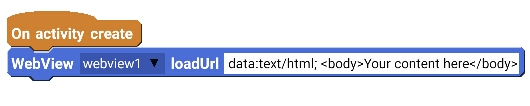
Now go to Logic of your page (MainActivity.java for Main.xml) and in onCreate event use following block:
WebView ......... loadUrl .............
Now fill this block as below:
WebView webview1 loadUrl data:text/html, <html > <title> </title> <body> Write your HTML code here. </body> </html>
Step 4
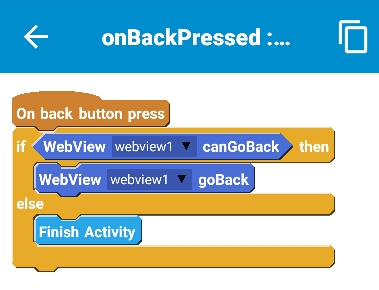
Also add onBackPressed event and use following blocks:
If webview1 canGoBack
WebView webview1 goBack
else
FinishActivity
Save and Run your app. Your app will show contents of your HTML code at the place where webview is located.
You can use CSS and JavaScript in your code. You can insert links to gif and images.
To enable the links in the HTML code, and to enable JavaScript in the HTML code, insert the following code using 'add source directly' block in onCreate.
WebSettings webSettings=webview1.getSettings(); webSettings.setJavaScriptEnabled(true); webSettings.setJavaScriptCanOpenWindowsAutomatically(true); if(android.os.Build.VERSION.SDK_INT >= android.os.Build.VERSION_CODES.JELLY_BEAN) { webSettings.setAllowFileAccessFromFileURLs(true); webSettings.setAllowUniversalAccessFromFileURLs(true); }
We will copy this thread to your clipboard so you can paste it into an external AI tool.